Blog
What Can You Get Done with Figr AI in 2026: Full Review
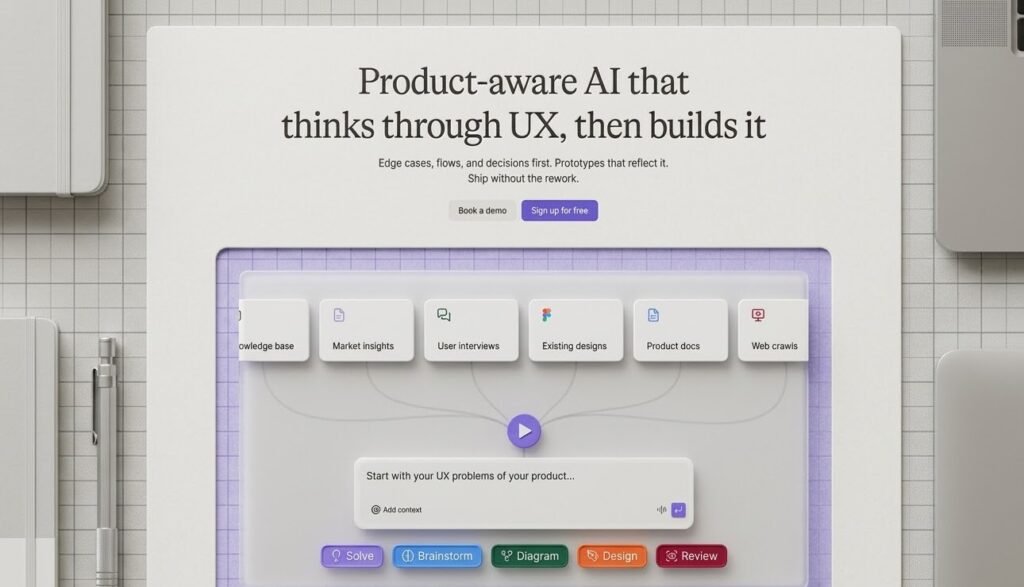
The design landscape has shifted dramatically over the past few years. What started as simple mockup tools has evolved into intelligent systems that actually think through product decisions. Enter Figr AI a platform that positions itself not just as another design tool, but as a genuine product thinking partner for teams who care about user experience.
I spent time exploring what Figr offers in 2026, and the capabilities go far beyond what traditional prototyping software provides. This review breaks down exactly what you can accomplish with this AI design agent and whether it deserves a spot in your product workflow.
Understanding What Figr Actually Does
Most design tools focus on the visual layer. You drag components, adjust colors, and export assets. Figr takes a fundamentally different approach. It starts with product context and works backward to create designs that actually make sense for your users.
The platform markets itself as “product-aware AI that thinks through UX, then builds it.” That is not marketing fluff—it is the core differentiator. When you feed Figr a product requirement, it does not immediately start drawing rectangles. It first analyzes edge cases, maps decision trees, and considers the full user journey before generating a single interface element.
This methodology matters because it addresses the biggest pain point in product development: rework. How many times have you built something, shipped it, and then discovered a critical flow you missed? Figr aims to catch those issues during the design phase, not after launch.
Core Capabilities Worth Knowing
Intelligent UX Analysis
Figr examines your product requirements and identifies potential friction points before they become expensive problems. The system thinks through states, errors, and alternative paths that human designers might overlook in initial iterations.
For example, if you are designing a payment flow, Figr automatically considers network degradation scenarios, card decline states, and retry mechanisms. It generates flow diagrams showing exactly how users move through these situations.
User Flow and Journey Mapping
The platform excels at visualizing complex user paths. Instead of static screens, you get interconnected diagrams that show decision points, state transitions, and system responses. These are not just pretty pictures—they are functional maps that developers can actually reference during implementation.
The Zoom network degradation case study on their site demonstrates this perfectly. Figr mapped out five distinct connection states (Stable, Minor Degradation, Moderate Degradation, Severe Degradation, Critical Degradation) with specific UI responses and automatic adjustments for each scenario.
High-Fidelity Prototyping
Once the thinking phase completes, Figr generates prototypes that look and feel like your actual product. These are not wireframes or rough sketches. The output matches your design system tokens, maintains visual consistency, and provides a realistic preview of the final experience.
The X.com soft mute example shows how Figr recreated Twitter’s trending topics interface with proper dark mode styling, navigation elements, and content hierarchy that matches the real application.
Analytics-Driven Design Suggestions
Here is where Figr gets interesting for data-informed teams. The platform can read your existing analytics data and provide design recommendations based on actual user behavior patterns. It identifies drop-off points, suggests flow improvements, and grounds its feedback in real usage patterns rather than assumptions.
Automated Documentation
Writing product requirement documents consumes hours that most teams do not have. Figr drafts PRDs and technical specifications automatically, pulling from the design decisions it made during the creation process. This documentation stays synced with your designs, reducing the drift that typically occurs between specs and implementation.
Design System Enforcement
If you have established design tokens and component libraries, Figr respects them. The platform enforces your design system constraints, ensuring that generated interfaces maintain brand consistency and technical feasibility. No more designs that look great but cannot be built with your existing component library.
One-Click Figma Export
Figr recognizes that most design teams still rely on Figma for detailed refinement. The export functionality transfers your work seamlessly, preserving layers, components, and styling so your design team can pick up where the AI left off.
Built-In Accessibility Checks
Accessibility often becomes an afterthought, checked only when compliance requires it. Figr integrates accessibility validation into the design process itself, catching contrast issues, navigation problems, and screen reader compatibility concerns before they reach production.
Real-World Applications
The platform showcases several live project examples that demonstrate practical value:
Financial Services: The Wise freeze card test case shows how Figr mapped the complete user experience when a frozen card gets declined. It covered merchant experience, error codes, push notifications, in-app activity feeds, and quick action flows—all the touchpoints that create user anxiety if handled poorly.
Video Conferencing: Zoom’s network degradation handling required complex state management. Figr identified automatic quality adjustments, visual indicators, and recovery flows that maintain user trust during technical difficulties.
Social Platforms: Recreating X.com’s interface required understanding content hierarchy, real-time updates, and navigation patterns that keep users engaged.
These examples prove Figr handles enterprise-level complexity, not just simple landing pages.
Who Benefits Most
Product Managers gain a thinking partner that catches edge cases they might miss while focused on core functionality. The automated PRD generation alone saves significant documentation time.
UX Designers get a head start on complex flows. Rather than staring at a blank canvas, they receive thoroughly considered starting points that they can refine and elevate.
Development Teams receive clearer specifications with fewer ambiguities. When Figr maps out state transitions and error handling upfront, engineers spend less time asking clarifying questions and more time building.
Startup Founders working without dedicated design resources can generate professional-grade prototypes and documentation that help them communicate vision to investors and early team members.
Pricing Overview
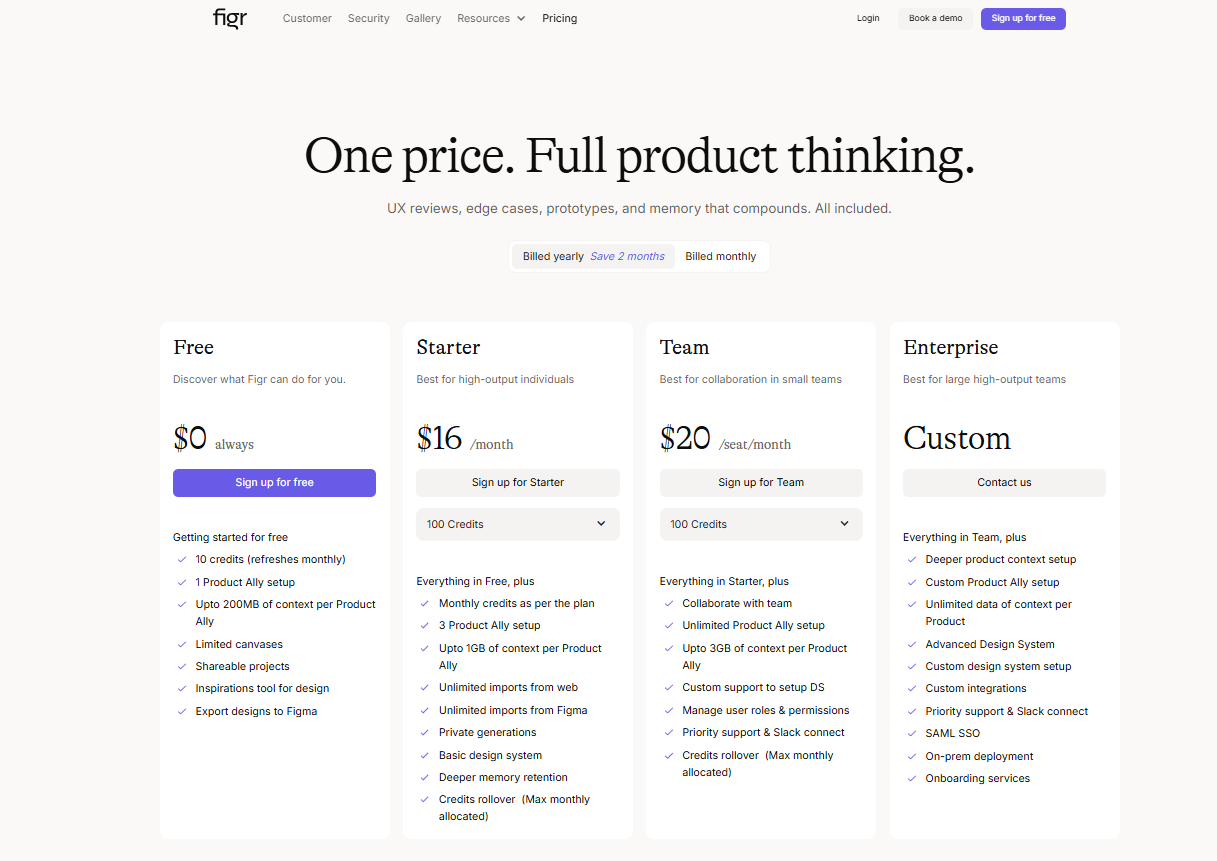
Figr offers different tiers depending on team size and feature requirements. The platform scales from individual creators up to enterprise teams managing multiple complex products.
For the most current pricing information and plan details, check the official pricing page here: figr.design/pricing
Limitations to Consider
No tool solves every problem. Figr works best when you have clear product requirements to feed it. Vague inputs produce generic outputs. The platform augments human decision-making rather than replacing it entirely.
Teams with highly specialized or unconventional design systems may need to spend time configuring Figr to respect their specific constraints. The learning curve involves understanding how to prompt the system effectively to get the most thoughtful results.
Integration with existing development workflows requires planning. While Figma export works smoothly, connecting Figr’s outputs to your project management and version control systems takes setup.
The Verdict for 2026
Figr represents where product design is heading. The distinction between “design tools” and “product thinking tools” matters more now than ever. Teams that ship faster without sacrificing UX quality will dominate their markets.
The 500+ teams already using Figr suggest the value proposition resonates. For product teams tired of discovering edge cases during QA, tired of documentation that falls out of sync with designs, and tired of prototypes that look nothing like the final build—Figr offers a genuine alternative.
It is not about replacing designers. It is about elevating the entire product development process so human creativity focuses on differentiation rather than infrastructure.
If your team values user experience and moves fast, Figr deserves serious consideration. The combination of intelligent analysis, comprehensive documentation, and production-ready outputs addresses pain points that have plagued product teams for decades.
This review reflects Figr’s capabilities as of March 2026. Product features evolve rapidly, so verify current functionality on their official website before making purchase decisions.