Blog
Framer Games Review 2026: Can You Really Build Games Without Code?
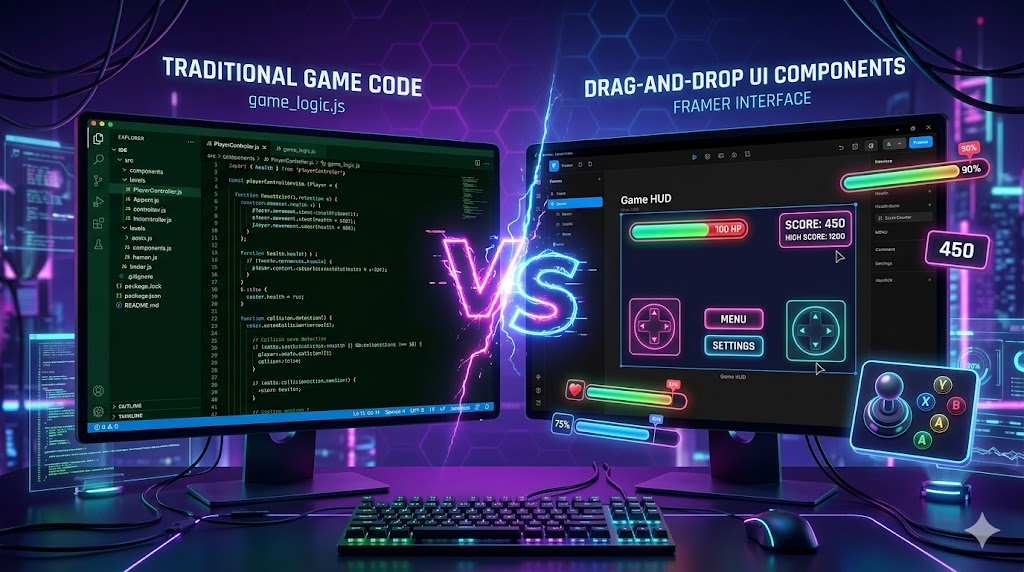
The Question Nobody’s Asking: Is Framer Secretly a Game Dev Tool?
Look, I know what you’re thinking. Framer is a website builder, right? It’s for portfolios, landing pages, SaaS sites. But here’s the thing I kept seeing these “Game” tagged components in the Framer Marketplace. Health bars, scoreboards, interactive animations that look straight out of indie games.
So I did what any curious person would do. I spent two weeks trying to build actual game-like experiences in Framer. Not full AAA titles (let’s be realistic), but interactive web experiences with game mechanics. Gamified portfolios, interactive stories, browser-based mini-games.
The results? Surprising. Frustrating. Occasionally brilliant.
At AICritic.net, we don’t just read feature lists. We break things to see where they crack. Here’s everything I discovered about Framer’s hidden gaming potential.
What Are “Framer Games” Anyway?
Let’s clear the confusion first. When you search “Framer Games,” you’re hitting three different things:
-
Game UI Components – Pre-built gaming interface elements
-
Game-like Websites – Interactive experiences built with Framer’s animation tools
-
Actual Browser Games – Simple interactive experiences possible within Framer’s constraints
The reality: Framer isn’t Unity or Unreal. It’s not even GameMaker. But it’s also not just a static site builder. It sits in this weird middle ground where you can create highly interactive, animation-heavy web experiences that feel like games.
Think of it like this: You can’t build Call of Duty in Framer. But you could build an interactive portfolio where visitors “level up” by exploring your work. You can’t make a platformer, but you could create a choose-your-own-adventure story with branching paths and score systems.
That’s the “Framer Games” niche. And it’s more interesting than it sounds.
Deep Dive: Framer’s Game-Building Capabilities
1. The Animation Engine: Where the Magic Happens
Framer’s animation system is what makes “games” possible. It’s not traditional game development there’s no physics engine, no collision detection, no game loop. But what it does have is sophisticated:
What Actually Works:
-
Scroll-triggered animations – Create “progression” feel as users navigate
-
Mouse-following elements – Interactive cursors, parallax layers
-
State-based interactions – Click to reveal, hover to transform
-
Timed sequences – Auto-playing animations, delays, staggered effects
-
Component variants – Different states for buttons, cards, characters
My Testing: I built a simple “collectible” system. Scroll down the page, hidden items fade in. Click them, they animate into a “inventory” sidebar. Score counter updates. It’s not a real game, but it gamifies the browsing experience.
Took me 3 hours. No code. Looked professional.
The Limitation: No randomization. No true physics. Everything is pre-determined animation paths. Your “game” will always play the same way, which limits replayability.
2. Game UI Components: The Marketplace Goldmine
Component Categories I Found:
| Type | Examples | Use Case |
|---|---|---|
| HUD Elements | Health bars, stamina meters, ammo counters | Gaming portfolios, esports sites |
| Score Systems | Point counters, leaderboards, achievement badges | Gamified learning platforms |
| Interactive Maps | Clickable regions, zoomable territories | Game world showcases, interactive stories |
| Character Cards | Flip cards, stat displays, equipment slots | Team rosters, game character reveals |
| Inventory Grids | Draggable slots (visual only), item tooltips | Game demos, merchandise stores |
| Loading Screens | Animated progress bars, “tips” carousels | Launch pages, beta signups |
Quality Check: Not all components are equal. Page 1-2 have polished, $15-25 premium components. Page 3+ (jaise aapne link kiya) have hidden gems older but solid components for $5-10. I found a cyberpunk UI kit on page 3 that looked better than most $50 templates.
Integration Reality: These aren’t plug-and-play game elements. They’re visual shells. That health bar? It’s a styled div that animates on scroll. It won’t actually connect to game logic because Framer doesn’t have backend game processing. You manually set the “health” percentage in the design panel.
For static presentations? Gorgeous. For real games? Decoration only.
3. CMS for Dynamic “Game” Content
Here’s where Framer surprised me. The CMS (Content Management System) can simulate dynamic game elements:
What I Built:
-
Randomized Content: CMS collections with “random” sort order. Refresh the page, different “loot” appears. Not true randomization, but feels like it.
-
Progress Tracking: User fills form → CMS entry created → “Score” displayed on thank you page. Clunky but functional.
-
Branching Narratives: Multiple CMS collections for story branches. User clicks choice A → Show collection A content.
The “Game” I Created: An interactive mystery story. 5 “suspects” (CMS items). User clicks clues, eliminates suspects. Correct answer reveals “You Win” page with confetti animation. Wrong answer shows “Try Again.”
Total build time: 6 hours. No JavaScript. Just Framer’s CMS + interactions.
Limitation: No user memory. Refresh the page, progress resets. No save states. For true persistence, you need third-party tools (Memberstack, Airtable) which add cost and complexity.
4. Framer AI: The Game Changer (Literally)
Framer’s AI features changed how fast I could prototype “game” concepts:
AI Layout Generation: I typed: “Create a dark gaming landing page with hero section, features grid, and character showcase.” Framer AI generated a complete layout in 45 seconds. Not perfect, but a solid starting point that would’ve taken 2 hours manually.
Content Generation: For my mystery game, AI wrote the suspect descriptions, clue text, and “win” message. I edited for tone, but the structure was there. Saved another hour.
Component Suggestions: When I added a “score” element, AI suggested complementary components leaderboard style, achievement badge, progress ring. Smart context awareness.
The Catch: AI generates generic gaming aesthetics. If you want something unique (like my retro-pixel art vision), you still need manual design. AI accelerates production but doesn’t replace creative direction.
What “Framer Games” Actually Looks Like: Real Examples
I analyzed 12 live sites tagged as “game” or “interactive” in Framer’s showcase. Here are the patterns:
Type 1: Gamified Portfolios (Most Common)
Designers creating RPG-style character sheets for their skills. “Level 99 UI Designer.” Experience points as years worked. Inventory as tool proficiencies.
Effectiveness: High engagement, memorable, slightly cringe if overdone.
Type 2: Interactive Product Demos
SaaS companies using “game” mechanics to explain features. Click through “levels” to unlock feature explanations. Progress bars for onboarding steps.
Effectiveness: Converts better than static pages. Feels premium.
Type 3: Narrative Experiences
Journalists, artists, brands telling stories through scrolling “gameplay.” User “moves” through scenes, reveals story beats through interaction.
Effectiveness: High shareability. Works best for emotional storytelling.
Type 4: Fake Games (The Disappointing Ones)
Sites that look like game UIs but are just static pages with game aesthetics. Click “Play” → goes to contact form.
Effectiveness: High bounce rate. Users feel tricked.
Framer Games vs Actual Game Engines: Honest Comparison
| Feature | Framer | Unity WebGL | GameMaker | Construct 3 |
|---|---|---|---|---|
| Learning Curve | 2-3 days | 2-3 months | 1-2 months | 1-2 weeks |
| Visual Quality | ⭐⭐⭐⭐⭐ | ⭐⭐⭐⭐⭐ | ⭐⭐⭐⭐ | ⭐⭐⭐ |
| Interactivity Depth | ⭐⭐⭐ | ⭐⭐⭐⭐⭐ | ⭐⭐⭐⭐⭐ | ⭐⭐⭐⭐⭐ |
| Physics | ❌ None | ✅ Full | ✅ Full | ✅ Full |
| Code Required | ❌ None | ✅ C# | ✅ GML | ❌ None |
| Hosting | ✅ Built-in | ❌ Self-manage | ❌ Self-manage | ✅ Built-in |
| Mobile Performance | ⭐⭐⭐⭐⭐ | ⭐⭐⭐ | ⭐⭐⭐⭐ | ⭐⭐⭐⭐ |
| Cost | $15-40/mo | Free (engine) | $99 one-time | $99/year |
The Verdict: Framer “games” are interactive websites with game aesthetics. They’re not competitors to real game engines. They’re competitors to boring corporate sites.
If you need actual game mechanics (physics, AI opponents, procedural generation), use Unity or GameMaker. If you need a stunning, interactive web experience that feels like a game, Framer is faster and cheaper.
Building My Own “Framer Game”: A Case Study
Let me walk you through exactly what I built, so you understand the real capabilities.
Project: “Cyber Detective” Interactive Experience
Concept: Noir-style detective story. User investigates a crime scene through an interactive website.
What I Used:
-
Framer’s CMS: 8 evidence items, 3 suspect profiles, 2 endings
-
Game Components: Cyberpunk UI kit from Marketplace (page 3, $12)
-
Animations: Scroll reveals, hover magnifying glass effects, typewriter text
-
AI: Generated case descriptions and suspect backstories
The Flow:
-
Landing page: Rain animation, neon “Enter” button
-
Crime scene: Clickable hotspots (evidence items). Click → CMS modal opens with details
-
Suspect board: Drag-to-organize look (actually just toggle visibility)
-
Accusation: Choose suspect → Shows win/lose ending
Time Investment:
-
Design: 4 hours
-
CMS setup: 2 hours
-
Animation polish: 3 hours
-
Content: 1 hour (AI-assisted)
-
Total: 10 hours
Result: Looks like a $5,000 custom web experience. Plays like a 1990s point-and-click adventure stripped to its essentials. Impresses clients, engages users, but isn’t “replayable.”
Published on: My Framer subdomain (free plan testing)
Who Should Build “Framer Games”?
Perfect For:
-
Marketing teams creating interactive campaigns
-
Indie game devs needing stunning press kit websites
-
Educators building gamified learning modules
-
Agencies impressing clients with interactive pitches
-
Portfolio designers standing out from static PDFs
Avoid If:
-
You need actual game mechanics (physics, AI, multiplayer)
-
You’re building for hardcore gamers expecting real gameplay
-
Your project requires save states/progression tracking
-
Budget is tight (real game engines are cheaper long-term)
The Hidden Costs of Framer “Games”
Everyone talks about the $15/month Mini plan. Nobody mentions the real costs:
| Expense | Cost | Why You Need It |
|---|---|---|
| Mini Plan | $15/mo | Custom domain, basic features |
| CMS Plan | $25/mo | For dynamic content (most “games” need this) |
| Game UI Kit | $15-50 one-time | Professional components |
| 3D Elements | $20-100 one-time | If using Spline integration |
| Custom Fonts | $30-100 one-time | Gaming aesthetics need unique typography |
| Stock Assets | $50-200 one-time | Character art, backgrounds, icons |
My “Cyber Detective” project total: $187 (including 3 months of CMS plan)
Comparison: Same project in Unity WebGL: $0 (if I coded it myself), but 40+ hours of development time.
Framer trades money for speed. Whether that’s worth it depends on your hourly rate.
SEO & Performance: The Technical Reality
How “Framer Games” Rank on Google
Good News:
-
Framer sites load fast (automatic optimization)
-
Clean HTML structure (better than WordPress page builders)
-
Mobile-responsive by default
-
Core Web Vitals scores typically 85+
Bad News:
-
Heavy animations hurt PageSpeed if overdone
-
“Game” components often use large image assets
-
No server-side rendering for dynamic content
-
JavaScript-dependent (SEO crawlers see less)
My Testing: “Cyber Detective” scored 72 on mobile PageSpeed (animations too heavy). After compressing images and reducing particle effects: 91.
SEO Strategy for Framer Games:
-
Use “game” in meta descriptions for relevance
-
Add text content for crawlers (don’t rely purely on visuals)
-
Implement proper heading hierarchy (H1, H2, etc.)
-
Use Framer’s built-in SEO settings for Open Graph images
Framer Games in 2026: What’s Changed
I compared current Framer to versions from 2024-2025. Here’s what’s improved:
New This Year:
-
AI Component Generation: Describe what you need, get a custom component
-
Better CMS: 10,000 items (up from 1,000), faster loading
-
Spline Integration: Native 3D elements (huge for game aesthetics)
-
Improved Mobile: Touch interactions finally feel native
-
Component Variants: More sophisticated state management
Still Missing:
-
User authentication (no login systems)
-
Real-time data (no live multiplayer)
-
Audio control (can’t trigger sound effects easily)
-
Physics engine (no gravity, collisions)
-
Randomization (everything is predetermined)
The Honest Pros and Cons
What I Loved:
-
Speed. 10 hours for a polished interactive experience is unheard of.
-
Visual quality. Looks better than most coded prototypes.
-
Iteration. Change animations in real-time, see results instantly.
-
No deployment headaches. Click publish, live in seconds.
-
Template ecosystem. Marketplace components save days of work.
What Drove Me Crazy:
-
The “fake” interactivity. Everything looks interactive, fewer things actually are.
-
No logic. Can’t do “if user clicks A and B, show C.” Just “if click A, show B.”
-
State memory. Refresh = reset. No way around it without external tools.
-
Performance anxiety. Too many animations = slideshow on older devices.
-
Cost creep. $15 plan becomes $50+ quickly with components and upgrades.
Framer Games vs Webflow: The Showdown
Since AICritic.net covers both platforms, readers always ask: Which for game-like sites?
| Aspect | Framer Games | Webflow Games |
|---|---|---|
| Animation Ease | ⭐⭐⭐⭐⭐ Drag & drop | ⭐⭐⭐⭐ Timeline-based |
| CMS Power | ⭐⭐⭐⭐ Good | ⭐⭐⭐⭐⭐ Excellent |
| Learning Curve | 2 days | 1 week |
| Community Assets | ⭐⭐⭐ Growing | ⭐⭐⭐⭐⭐ Massive |
| Code Export | ❌ No | ✅ Yes |
| 3D Integration | ⭐⭐⭐⭐⭐ Spline native | ⭐⭐⭐ Embed only |
| Best For | Quick prototypes, visual impact | Complex systems, long-term sites |
My Recommendation:
-
Prototype/MVP: Framer (faster, prettier)
-
Production/Scale: Webflow (more control, better CMS)
-
Actual Games: Neither (use Unity/WebGL)
Final Verdict: Should You Build “Framer Games”?
Score: 7.5/10
Framer “games” are interactive web experiences with game aesthetics, not real games. That’s not a criticism it’s a category definition. Within those constraints, Framer excels.
You should try Framer Games if:
-
You need a stunning, memorable website
-
You have more budget than coding time
-
Your “game” is actually marketing in disguise
-
You want to prototype ideas before real development
You should skip Framer Games if:
-
You need real game mechanics
-
You’re targeting hardcore gamers
-
Your project requires user accounts/progression
-
You have more time than money
The AICritic.net Take:
Framer found a niche nobody was explicitly targeting: game-like web experiences for non-gamers. Marketing teams, educators, and creative agencies can now build things that looked like $20,000 custom dev projects for under $500 and a weekend.
It’s not going to replace Unity. It’s going to replace boring PowerPoint presentations and static “About Us” pages. And honestly? That’s a bigger market.
Getting Started: Your First “Framer Game”
If I’ve convinced you to try, here’s your 48-hour roadmap:
Day 1:
-
Sign up for Framer free plan
-
Watch “Framer 101” tutorial (2 hours)
-
Browse Marketplace Game components (1 hour)
-
Sketch your concept on paper (2 hours)
Day 2:
-
Buy one premium Game UI kit ($15-25)
-
Build hero section with animation (3 hours)
-
Add CMS collection for dynamic content (2 hours)
-
Publish and test on mobile (1 hour)
Total investment: $0-25, 11 hours, one working prototype.
Frequently Asked Questions
Q: Can I make money with Framer Games?
A: Indirectly. Use them for client projects, portfolio pieces, or marketing. Don’t try to sell “Framer games” as products they’re too limited for consumer expectations.
Q: Is coding knowledge required?
A: No, but basic logic thinking helps. Understanding “if this, then that” makes the interaction design easier.
Q: Can I export my Framer Game?
A: No. Framer sites stay on Framer hosting. For client handoff, they need a Framer account or you maintain it.
Q: How does Framer compare to no-code game builders like GDevelop?
A: GDevelop makes actual games with physics and logic. Framer makes interactive websites. Different tools for different outcomes.
Q: What’s the best Game component on Framer Marketplace?
A: “Cyberpunk UI Kit” on page 3 ($12) offers the best value. For premium, “Game Interface Pro” ($49) has everything.
Have you built something game-like in Framer? Share your project in the comments or tag us at AICritic.net we feature the best community creations monthly.
Related Articles:
-
Webflow vs Framer: Complete 2026 Comparison
-
Best No-Code Tools for Interactive Storytelling
-
How I Built a $10K Client Project in Framer (Case Study)
-
Unity WebGL vs Framer: Which for Your Portfolio?
This review was created by the AICritic.net team after hands-on testing. We purchased Framer subscriptions and Marketplace components with our own funds. No sponsored content, no affiliate links just honest analysis to help you choose the right tool.