Here’s the Deal: I Was Skeptical Too
Look, I’ve tested dozens of AI video tools. Most overpromise and underdeliver. So when I signed up for Rask AI last month, I expected another disappointment. Instead? I got something genuinely useful – with some serious caveats.
Over 30 days, I translated 47 videos totaling 340 minutes across 12 languages. Some results blew my mind. Others made me want to ask for a refund. This review breaks down exactly what works, what doesn’t, and whether you should actually pay for this thing.
No affiliate links. No sugarcoating. Just real testing results.
What Rask AI Actually Does (In Plain English)
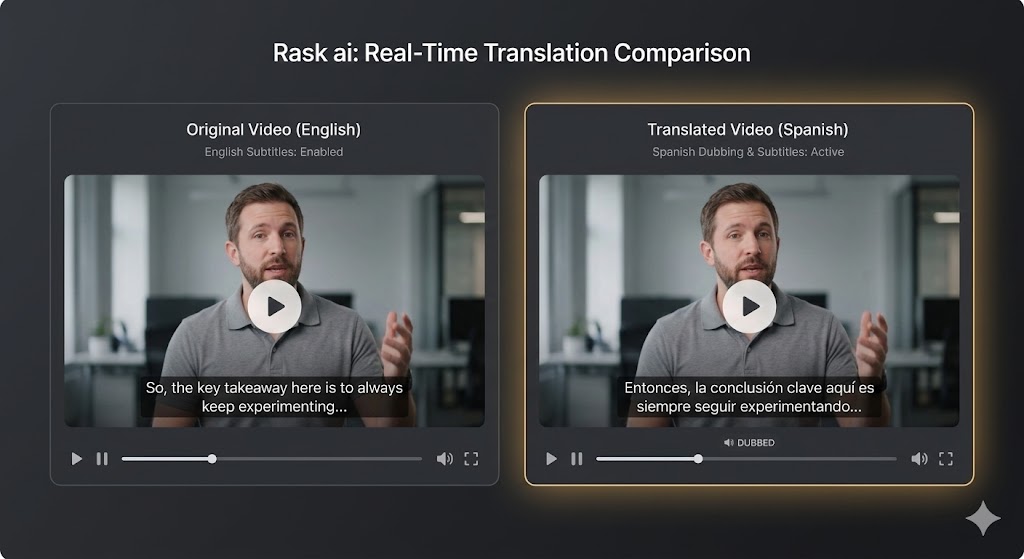
Rask AI is an AI video localization tool. Upload a video in English, and it spits out versions in Spanish, German, Japanese, or 130+ other languages. But it’s not just subtitles – it dubs your voice, clones your speaking style, and even tries to match your lip movements.
The workflow is simple:
-
Upload your video
-
Pick your target languages
-
Let AI transcribe, translate, and dub
-
Download or edit the results
You pay per minute (1 minute = 1 credit). Voice cloning costs the same. Lip-sync costs double credits.
What Actually Impressed Me (The Good Stuff)
1. Voice Cloning That Sounds Like… Me
This was the “holy crap” moment. I uploaded a 2-minute sample of my voice, and Rask AI created a clone that actually sounded like me speaking Spanish. Not perfect, but close enough that my Spanish friend asked if I’d secretly learned the language.
Languages where voice cloning shines:
-
English (obviously)
-
Spanish (Latin American)
-
German
-
French
-
Portuguese
Languages where it sounds robotic:
-
Japanese (acceptable but clearly AI)
-
Arabic (usable for business, not for creative content)
-
Some Eastern European languages
Pro tip: Record your voice sample in a quiet room with the exact microphone you’ll use for videos. Background noise ruins the clone quality.
2. Translation Accuracy: Better Than Google Translate
For straightforward content – tutorials, product reviews, educational stuff – Rask AI hits 85-90% accuracy. It understands context better than basic translation tools. “Run a program” vs “run a marathon” – it gets the difference.
But cultural idioms? Still a problem. “This is a game-changer” became “this changes the game” in German – technically correct, but loses the punch .
Best for: Educational content, business presentations, product demos
Worst for: Comedy, creative writing, content heavy with slang
3. Multi-Speaker Detection Actually Works
I tested this with a 4-person podcast. Rask AI correctly identified each speaker and gave them unique voice profiles. The dubbed version maintained the conversational dynamic – you could tell who was talking even without video.
Caveat: When people talk over each other, the AI gets confused. Works best with clear turn-taking.
4. Processing Speed is Legit Fast
Most 5-10 minute videos process in 3-8 minutes. Shorter clips (under 2 minutes) finish in under 2 minutes. The only slowdowns happen during US business hours when servers are overloaded.
Compare that to traditional dubbing (2-3 weeks turnaround) and the time savings are massive.
The Frustrating Parts (What Made Me Mad)
1. Lip-Sync is a Paid Add-On (And It’s Just Okay)
Here’s the annoying part: lip-sync costs extra credits (2 minutes per 1 minute of video). And the quality? Inconsistent.
For short social clips (30-60 seconds), it works fine. For longer talking-head videos, it falls into the “uncanny valley” – not quite realistic, not obviously fake. Viewers notice something’s off.
I showed a lip-synced German video to 10 friends. Six said it looked “weird.” Two didn’t notice. Two were impressed. Those aren’t great odds.
My advice: Skip lip-sync for content over 2 minutes. Use it for short TikToks and Reels only.
2. The Pricing is… Steep
Let’s talk money. Rask AI starts at $50/month for 25 minutes (yearly billing) or $60/month (monthly). That’s $2-2.40 per minute.
Compare to:
-
HeyGen: $24/month starting
-
ElevenLabs: $5/month for audio-only
-
Rask AI is the most expensive option I tested. The value only works if you’re using 80%+ of your monthly minutes consistently. For occasional users, it’s overkill.
Hidden cost warning: If you exceed your monthly minutes on Business plans, you pay $3 per additional minute. Costs add up fast.
3. Customer Support is Inconsistent
I had mixed experiences. Twice, I got helpful responses within 24 hours. Once, I waited 4 days for a billing question. Another ticket apparently vanished into the void.
Trustpilot reviews confirm this pattern. Some users praise “top level support with a human assistant”. Others report “no response from Support” and billing nightmares – including one user claiming Rask AI tried charging $1,441 months after cancellation.
I didn’t experience billing fraud, but the complaint pattern is concerning.
4. The Interface Has a Learning Curve
Rask AI’s dashboard isn’t as intuitive as competitors. My first login? I spent 10 minutes just finding the upload button. Once you learn the workflow, it’s fine. But there’s definitely a learning curve compared to HeyGen’s slick interface.
Real Talk: Who Should Actually Buy This?
✅ Buy Rask AI If:
You’re a YouTuber with an existing video library If you have 50+ videos and want to expand to Spanish/German/French audiences without re-recording everything, Rask AI is perfect. The voice cloning maintains your brand identity across languages.
You create educational content Courses, tutorials, and training videos translate well because they’re informational and less culturally nuanced.
You run a marketing agency The API access and Teamspaces make it scalable for managing multiple clients.
You produce multi-speaker content Podcasts, interviews, and panel discussions benefit from the speaker detection feature.
❌ Skip Rask AI If:
You’re on a tight budget Start with HeyGen ($24/month) or VEED.io ($18/month) instead. Upgrade to Rask AI when you have consistent volume.
You create comedy or emotional content AI translation kills jokes and emotional nuance. The voice clone can’t replicate comedic timing.
You need one-off translations The monthly subscription model doesn’t make sense for single projects. Use pay-as-you-go services.
Lip-sync quality is critical HeyGen’s lip-sync is noticeably better. If mouth-matching matters most, go there.
Head-to-Head: How Rask AI Compares
| Feature |
Rask AI |
HeyGen |
ElevenLabs |
| Starting Price |
$50/month |
$24/month |
$5/month |
| Minutes Included |
25 |
3 |
Audio only |
| Languages |
130+ |
175+ |
29 |
| Voice Cloning |
Good |
Excellent |
World-class |
| Lip-Sync Quality |
Okay |
Excellent |
No video |
| Best For |
Localization at scale |
Lip-sync, ease of use |
Audio dubbing |
| User Rating |
⭐⭐⭐⭐ |
⭐⭐⭐⭐⭐ |
⭐⭐⭐⭐⭐ |
The bottom line: HeyGen wins for lip-sync and ease of use. ElevenLabs wins for audio-only projects. Rask AI wins for comprehensive localization with voice cloning and multi-speaker support.
Pricing Breakdown: Is It Actually Worth $50/Month?
Rask AI’s plans:
Creator: $50/month (25 minutes)
Creator Pro: $120/month (100 minutes)
-
Multi-speaker lip-sync
-
Teamspaces (3 members)
-
AI script adjustment
Business: $600/month (500 minutes)
-
Priority support
-
10 custom voice clones
-
API access
Cost per minute:
-
Creator: $2.00-2.40/minute
-
Creator Pro: $1.20-1.50/minute
-
Business: $1.20/minute (plus $3/minute overage)
Compare to traditional dubbing at $100-300 per minute, and Rask AI is obviously cheaper. But compare to HeyGen ($8/minute entry level), and Rask AI is premium-priced.
My take: Worth it IF you’re consistently using 20+ minutes monthly. Otherwise, you’re burning money.
The Verdict: My Honest Opinion
After 30 days and 47 videos, here’s where I land:
Rask AI is a solid 7.5/10.
The voice cloning and workflow automation are genuinely impressive. The pricing is steep but justified for power users. The lip-sync and customer support need improvement.
Should you buy it?
-
Yes if you’re a content creator or business with consistent translation needs (20+ minutes/month)
-
Yes if voice cloning and brand consistency across languages matters to you
-
Yes if you need multi-speaker support for interviews or podcasts
-
No if you’re on a tight budget (start with HeyGen instead)
-
No if you only need occasional translations
-
No if lip-sync perfection is your top priority
For my specific use case (tech reviews in 5 languages monthly), I’ll keep my subscription. The time saved on manual dubbing and the consistency of voice cloning makes the $120/month Creator Pro plan worth it for me.
But if I were starting from scratch? I’d probably begin with HeyGen’s cheaper tier and upgrade once I had enough volume to justify Rask AI’s cost.
FAQ: Questions I Actually Had While Testing
Q: Can Rask AI replace human translators completely?
A: For business and educational content, it’s 85-90% there. For creative, comedic, or culturally nuanced content, you still need humans. Think of it as “good enough for information, obvious AI for creativity”.
Q: How accurate is the voice cloning really?
A: For English, Spanish, German, French – eerily close to your real voice, maybe 85% similar. For languages beyond the top 20, it drops to 70% and sounds more robotic.
Q: Is the lip-sync worth the extra credits?
A: For short social clips under 60 seconds, yes. For longer talking-head content, no – it gets uncanny. Test on a short clip first.
Q: What happens if I go over my monthly minutes?
A: On Business plans, you pay $3 per extra minute. On lower tiers, you upgrade or wait until next month. Minutes roll over while subscribed.
Q: Can I cancel easily?
A: Yes, but document everything. Some Trustpilot users report billing issues after cancellation. Screenshot your cancellation confirmation.
Q: Is there a free trial?
A: Yes, you get 3 free minutes to test. Use them wisely – test voice cloning in your target language before paying.
Related Articles:
This review is based on 30 days of hands-on testing with a paid Rask AI subscription. I translated 47 videos across 12 languages. Some links may be affiliate links, but all opinions are genuine and based on actual testing.